


Configuring LinkedIn Ads as a Source
In the Sources tab, click on the “Add source” button located on the top right of your screen. Then, select the LinkedIn Ads option from the list of connectors. Click Next and you’ll be prompted to add your access.1. Add account access
You’ll need your LinkedIn Ads OAuth credentials for this connection. You can generate these in your LinkedIn Developer portal. Once you have them, add the account access, then click Next.- Authorization: Log in with a Linkedin account that has proper access to the LinkedIn Ads account you want to extract data from.
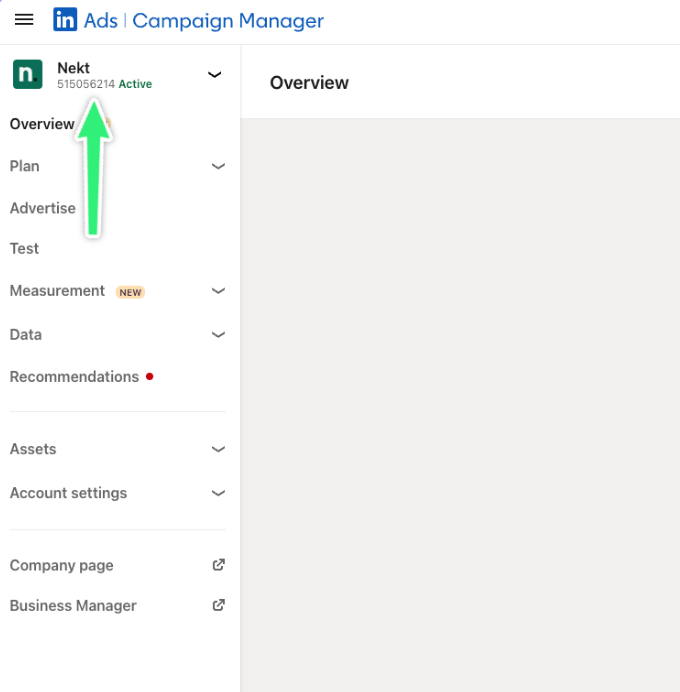
- Account ID: The ID for the LinkedIn Ads account you want to extract data from. This can be found on
https://www.linkedin.com/campaignmanagerright below the organization name on the left-side panel.
- Start Date: The earliest record date to sync. Records created or updated after the start date will be extracted.
- Lookback window (days): (Default: 28) Number of days to subtract from the bookmark in incremental mode to re-fetch records. The effective start date will never be earlier than the configured start date.
Linkedin only returns up to 1-year of historical data for daily performance reports.
2. Select streams
Choose which data streams you want to sync - you can select all streams or pick specific ones that matter most to you.Tip: The stream can be found more easily by typing its name.Select the streams and click Next.
3. Configure data streams
Customize how you want your data to appear in your catalog. Select a name for each table (which will contain the fetched data) and the type of sync.- Table name: we suggest a name, but feel free to customize it. You have the option to add a prefix and make this process faster!
- Sync Type: you can choose between INCREMENTAL and FULL_TABLE.
- Incremental: every time the extraction happens, we’ll get only the new data - which is good if, for example, you want to keep every record ever fetched.
- Full table: every time the extraction happens, we’ll get the current state of the data - which is good if, for example, you don’t want to have deleted data in your catalog.
4. Configure data source
Describe your data source for easy identification within your organization, not exceeding 140 characters. To define your Trigger, consider how often you want data to be extracted from this source. This decision usually depends on how frequently you need the new table data updated (every day, once a week, or only at specific times). Optionally, you can determine when to execute a full sync. This will complement the incremental data extractions, ensuring that your data is completely synchronized with your source every once in a while. Once you are ready, click Next to finalize the setup.5. Check your new source
You can view your new source on the Sources page. If needed, manually trigger the source extraction by clicking on the arrow button. Once executed, your data will appear in your Catalog.Streams and Fields
Below you’ll find all available data streams from LinkedIn Ads and their corresponding fields:Ad Accounts
Ad Accounts
Stream for fetching ad accounts information.Key Fields:
| Field | Type | Description |
|---|---|---|
id | Integer | The account ID. |
name | String | The account name. |
type | String | The account type. |
status | String | Current status of the account. |
currency | String | The account’s currency. |
reference | String | The LinkedIn organization reference URN. |
changeAuditStamps | Object | Audit timestamps for account creation and modification, including creator, modifier, and timestamps. |
notifiedOnCampaignOptimization | Boolean | Whether notifications are enabled for campaign optimization. |
notifiedOnCreativeApproval | Boolean | Whether notifications are enabled for creative approvals. |
notifiedOnCreativeRejection | Boolean | Whether notifications are enabled for creative rejections. |
notifiedOnEndOfCampaign | Boolean | Whether notifications are enabled for campaign end. |
servingStatuses | Array | List of serving statuses for the account. |
test | Boolean | Whether this is a test account. |
version | Object | Version information for the account. |
Campaign Groups
Campaign Groups
Stream for fetching campaign groups.Key Fields:
| Field | Type | Description |
|---|---|---|
id | Integer | Unique identifier of the record. |
name | String | Name of the record. |
status | String | Current status of the record. |
account | String | Identifier of the associated account. |
runSchedule | Object | Schedule for when the campaign group runs. |
changeAuditStamps | Object | Audit timestamps for campaign group creation and modification. |
test | Boolean | Whether this is a test record. |
servingStatuses | Array | List of serving statuses for the campaign group. |
allowedCampaignTypes | Array | List of campaign types allowed in the group. |
backfilled | Boolean | Whether the campaign group was backfilled. |
Campaigns
Campaigns
Stream for fetching campaigns.Key Fields:
| Field | Type | Description |
|---|---|---|
id | Integer | Unique identifier for the campaign. |
name | String | Name of the campaign. |
status | String | Current status of the campaign. |
type | String | Type of campaign (e.g. SPONSORED_UPDATES). |
account | String | URN of the associated advertising account. |
campaignGroup | String | URN of the campaign group. |
servingStatuses | Array | Current serving status of the campaign. |
locale | Object | Locale settings for the campaign, including country and language. |
version | Object | Version information for the campaign. |
associatedEntity | String | URN of the associated LinkedIn organization. |
test | Boolean | Whether this is a test campaign. |
runSchedule | Object | Campaign schedule information, including start and end timestamps. |
targeting | Object | Targeting settings for the campaign. |
optimizationPreference | Object | Campaign optimization preferences. |
optimizationTargetType | String | Target type for campaign optimization. |
changeAuditStamps | Object | Audit timestamps for campaign creation and last modification. |
dailyBudget | Object | Daily budget settings, including amount and currency code. |
unitCost | Object | Cost per unit settings, including amount and currency code. |
creativeSelection | String | Creative selection method (e.g. OPTIMIZED). |
costType | String | Cost type for the campaign (e.g. CPC). |
offsiteDeliveryEnabled | Boolean | Whether offsite delivery is enabled. |
audienceExpansionEnabled | Boolean | Whether audience expansion is enabled. |
Creatives
Creatives
Stream for fetching creatives.Key Fields:
| Field | Type | Description |
|---|---|---|
id | Integer | Unique identifier for the creative. |
status | String | Current status of the creative. |
campaign | String | URN of the associated campaign. |
account | String | URN of the associated account. |
createdAt | Integer | Timestamp when the creative was created. |
servingHoldReasons | Array | List of reasons why the creative is not serving. |
lastModifiedAt | Integer | Timestamp when the creative was last modified. |
isTest | Boolean | Whether this is a test creative. |
createdBy | String | URN of the user who created the creative. |
isServing | Boolean | Whether the creative is currently serving. |
lastModifiedBy | String | URN of the user who last modified the creative. |
intendedStatus | String | Intended status of the creative. |
content | String | URN reference to the creative content. |
Campaign Analytics
Campaign Analytics
Stream for fetching aggregated analytics per campaign.Key Fields:
| Field | Type | Description |
|---|---|---|
_id | String | Unique identifier for the analytics data. |
account_id | String | Account ID. |
campaign_id | String | Campaign ID. |
date | String | Date of the analytics data. |
impressions | Integer | Number of impressions served. |
clicks | Integer | Number of clicks received. |
totalEngagements | Integer | Total engagements (clicks, likes, shares, etc.). |
costInLocalCurrency | Number | Total cost in local currency. |
oneClickLeads | Integer | Number of one-click leads. |
externalWebsitePostClickConversions | Integer | Post-click conversions on external websites. |
externalWebsitePostViewConversions | Integer | Post-view conversions on external websites. |
videoViews | Integer | Number of video views. |
videoCompletions | Integer | Number of completed video views. |
likes | Integer | Number of likes. |
shares | Integer | Number of shares. |
follows | Integer | Number of follows. |
comments | Integer | Number of comments. |
reactions | Integer | Number of reactions. |
landingPageClicks | Integer | Clicks to landing page. |
companyPageClicks | Integer | Clicks to company page. |
sends | Integer | Number of messages sent. |
opens | Integer | Number of messages opened. |
Creative Analytics
Creative Analytics
Stream for fetching creative analytics.Key Fields:
| Field | Type | Description |
|---|---|---|
_id | String | Unique identifier for the analytics data. |
account_id | String | Account ID. |
creative_id | String | Creative ID. |
date | String | Date of the analytics data. |
impressions | Integer | Number of impressions served. |
clicks | Integer | Number of clicks received. |
totalEngagements | Integer | Total engagements (clicks, likes, shares, etc.). |
costInLocalCurrency | Number | Total cost in local currency. |
oneClickLeads | Integer | Number of one-click leads. |
externalWebsitePostClickConversions | Integer | Post-click conversions on external websites. |
externalWebsitePostViewConversions | Integer | Post-view conversions on external websites. |
videoViews | Integer | Number of video views. |
videoCompletions | Integer | Number of completed video views. |
likes | Integer | Number of likes. |
shares | Integer | Number of shares. |
follows | Integer | Number of follows. |
comments | Integer | Number of comments. |
reactions | Integer | Number of reactions. |
landingPageClicks | Integer | Clicks to landing page. |
companyPageClicks | Integer | Clicks to company page. |
sends | Integer | Number of messages sent. |
opens | Integer | Number of messages opened. |
Skills for agents
Download LinkedIn Ads skills file
LinkedIn Ads connector documentation as plain markdown, for use in AI agent contexts.